
Your WordPress website may look professional, load quickly, and have a contact form that works perfectly when a customer fills it out manually.
But what happens when a customer asks an AI assistant to find your services, collect information, and prepare an inquiry on their behalf?
Will that assistant understand your form fields? Can it locate the correct button? Will validation messages make sense? And can the customer review the information before anything is submitted?
These questions are becoming increasingly relevant as AI-powered browsing develops.
In 2026, AI agent-ready WordPress forms represent an emerging consideration for businesses that depend on website inquiries, consultations, and customer requests.
Preparing a form for AI-assisted interactions does not mean removing human oversight or allowing automated submissions without permission. Instead, it means making website interactions understandable, accessible, predictable, and secure.
This guide introduces a practical readiness test for WordPress business websites.
Why AI Agents Are Changing Website Interactions
Traditional website visitors navigate pages, click buttons, and complete forms manually.
AI browser agents are designed to assist with some of these activities.
For example, a business owner might ask an assistant:
“Find a WordPress development company, review its services, and prepare a message asking about redesigning my website.”
An authorized browser assistant may attempt to navigate a website, find its contact form, identify relevant fields, and prepare the requested information.
However, not every assistant supports these actions, and not every website can accommodate them reliably.
In June 2026, Google’s Chrome developer team introduced guidance for testing how effectively AI agents can interact with websites.
These developments suggest that website accessibility and predictable interactions are becoming relevant beyond traditional human browsing.
For businesses investing in WordPress development services, this creates an opportunity to review existing form functionality and identify usability problems before introducing more complex integrations.
1. Can an AI Agent Identify Every Contact Form Field?
The first readiness question is straightforward:
Can an automated browser identify what each form field is asking for?
Consider a typical business contact form containing:
- Full Name
- Email Address
- Phone Number
- Interested Service
- Project Details
- Submit Button
A human visitor can usually interpret these labels.
However, some WordPress forms rely heavily on placeholder text or visual styling without connecting accessible names to form controls.
For example, a field might display the placeholder “Your Email” without a properly associated label.
This can create difficulties for screen-reader users and automated systems that rely on the page’s accessibility structure.
A better approach is to provide proper labels and semantic HTML controls.
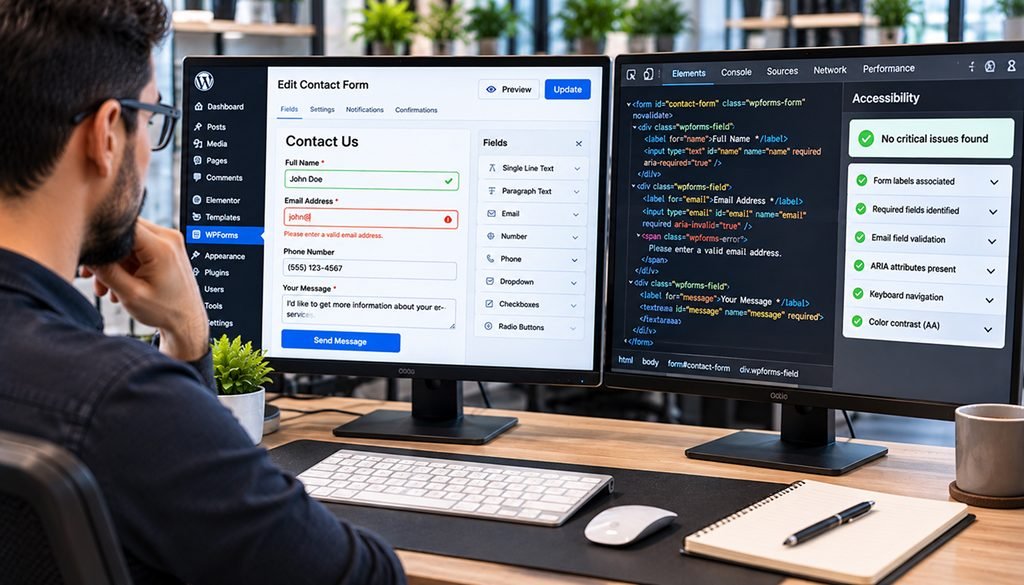
An accessible email field should have an identifiable name and use the appropriate input type.
Developers should also ensure that required fields are indicated programmatically rather than only through visual symbols.
These improvements primarily benefit accessibility and usability, while also making form interactions easier for compatible browser agents to interpret.
2. Test Form Validation Messages
A contact form may seem functional until a visitor enters incorrect information.
Imagine someone entering an invalid email address.
The website displays a red border around the field but provides no meaningful explanation.
A human visitor may guess what happened. A screen-reader user or browser assistant may have more difficulty identifying the problem.
Useful validation should explain:
- Which field requires attention.
- Why the current value is invalid.
- What the user needs to correct.
- Whether the form has been submitted successfully.
Error messages should be associated with their corresponding fields.
For example, instead of displaying only a red border, a website could explain:
“Enter a valid email address, such as name@example.com.”
This makes the experience more understandable for everyone.
Developers should test required fields, incorrect formats, empty submissions, and server-side validation.
3. Check Whether Popups and Dynamic Fields Create Problems
Modern WordPress websites frequently use interactive forms.
A contact form may appear inside a popup, open after clicking a button, or reveal additional questions based on the selected service.
These designs can be useful, but they require careful implementation.
For example, a visitor selecting “Ecommerce Development” may see additional fields about product catalogs, payment providers, and integrations.
A customer selecting “SEO Services” may see questions about rankings and website performance.
If conditional fields are not implemented correctly, automated interactions and assistive technologies may struggle to interpret the form.
Potential problems include:
- Forms that cannot be accessed using a keyboard.
- Popups without appropriate accessible labels.
- Hidden fields that remain incorrectly exposed.
- Buttons that do not communicate their purpose.
- Focus moving unpredictably after opening a popup.
Businesses using custom WordPress forms should test both visible and conditional fields.
The goal is to support a predictable experience without removing useful interactive features.
4. Review Elementor and WordPress Form Compatibility
Many business websites use Elementor, WPForms, Contact Form 7, or other WordPress form solutions.
These tools can provide different levels of customization, accessibility, and integration support.
However, installing a popular form plugin does not automatically guarantee AI-agent compatibility.
Elementor’s October 2026 work on agent readiness reflects growing interest in helping automated systems understand website content and interactions.
WPForms has also introduced AI-assisted form management capabilities through WordPress integration mechanisms.
Importantly, using AI to create or manage a form in the WordPress dashboard is different from allowing an external browser assistant to complete a public contact form.
These capabilities should not be confused.
Website owners should test the actual public form instead of assuming compatibility based on plugin marketing.
Businesses requiring complex workflows may benefit from custom web application development when standard form plugins cannot meet their integration and operational requirements.
5. Do Not Remove Security Controls Just to Support AI Agents
One of the biggest mistakes businesses could make is weakening form security to accommodate automated activity.
Contact forms are common targets for spam, unwanted submissions, and automated abuse.
Security protections may include:
- Server-side input validation.
- Rate limiting.
- Spam filtering.
- CAPTCHA challenges.
- Submission monitoring.
- Secure handling of personal information.
Some protections can interrupt legitimate automated browsing.
However, the solution is not to remove them indiscriminately.
Instead, developers should evaluate which interactions are intentionally supported and how permissions, human confirmation, and abuse prevention are maintained.
An AI assistant should not submit customer information without appropriate authorization.
Sensitive actions should require clear user consent and suitable technical safeguards.
For most businesses, improving accessible form structure is a more practical starting point than exposing unrestricted automated submission endpoints.
Latest Reading: Checkout Payment Failures in 2026
AI-assisted website interactions extend beyond contact forms.
Ecommerce businesses must also ensure that payment processing, checkout validation, and order confirmations work reliably.
In our recent article, Checkout Payment Failures in 2026: Shopify & WooCommerce Fixes, we explain how payment gateway errors, pending orders, duplicate transactions, and checkout interruptions affect online stores.
The guide also explains practical ways to investigate transaction problems without creating unnecessary duplicate charges.
6. Run a Five-Step WordPress Form Readiness Test
Businesses do not need to deploy a sophisticated AI integration to identify common form usability problems.
A structured audit can reveal many issues using ordinary browser and accessibility testing tools.
Test 1: Keyboard Navigation
Open the contact page and navigate using the keyboard.
Can you reach every field?
Can you select all relevant options?
Can you activate the submit button?
If a keyboard user cannot complete the form, the interface needs improvement regardless of AI compatibility.
Test 2: Accessible Field Names
Review the form using browser accessibility inspection tools.
Confirm that every input has a meaningful accessible name.
Fields should communicate their purpose without relying exclusively on visual position or placeholder text.
Test 3: Error Recovery
Submit the form with missing or invalid information in a safe testing environment.
Confirm that errors are clearly explained and associated with the relevant inputs.
Users should be able to correct mistakes without restarting the process.
Test 4: Layout Stability
Test the form on desktop and mobile devices.
Check whether buttons or fields shift unexpectedly while loading.
Sudden layout changes can cause usability problems and unreliable automated interactions.
Test 5: Submission Confirmation
Complete a controlled test submission with authorized test information.
Verify that the submission reaches the intended destination and that the website provides a clear success message.
Do not test with real customer information unnecessarily.
These checks establish a baseline for accessibility and interaction reliability, but they do not guarantee that every AI browser agent will successfully complete the form.
7. Build a WordPress AI Form Readiness Scorecard
Businesses can organize their findings with a simple internal scoring framework.
| Audit Area | Readiness Question |
| Field Labels | Does every input have an accessible name? |
| Keyboard Access | Can users navigate the entire form? |
| Error Handling | Are validation messages understandable? |
| Dynamic Content | Do popups and conditional fields work correctly? |
| Layout Stability | Do elements remain predictable while loading? |
| Security | Are spam and abuse protections maintained? |
| Confirmation | Is successful submission clearly communicated? |
Score each category from 0 to 2.
0 — Needs Improvement: Important requirements are missing or broken.
1 — Partially Ready: Basic functionality works, but some issues remain.
2 — Strong Foundation: The feature has been implemented and tested successfully.
The maximum score is 14.
This is a practical internal assessment framework, not an official Google or WordPress certification.
A strong score indicates that important usability foundations have been reviewed. It does not prove compatibility with every automated agent.

8. Should Businesses Implement WebMCP or AI-Specific Form Integrations?
WebMCP is an emerging approach intended to make supported website actions more understandable to compatible AI systems.
Instead of forcing an automated browser to interpret every interface element visually, a structured interaction can communicate available functionality more explicitly.
However, support for these capabilities continues to evolve.
Not every browser, website platform, or AI assistant uses the same mechanisms.
For many small businesses, immediate priorities should remain:
- Accessible contact forms.
- Clear error handling.
- Reliable submission processing.
- Secure customer information.
- Functional mobile experiences.
More advanced integrations should be evaluated when a business has a legitimate use case, suitable permissions, and resources to maintain the implementation.
Website owners should avoid installing experimental tools on production websites without appropriate testing.
9. Why Form Reliability Matters for Business Growth
A business website exists to help visitors take useful actions.
For a digital agency, that might involve requesting a project estimate.
For a professional services company, it could mean scheduling a consultation.
For a technology company, it might involve submitting a support inquiry.
If the contact form is confusing or unreliable, the website can lose legitimate inquiries.
The same weaknesses that affect automated interactions may also affect real visitors, especially people using assistive technologies or mobile devices.
Improving form accessibility and reliability therefore has practical value even if AI-assisted browsing adoption grows slowly.
At Thrive Studio Inc., we approach website development by focusing on functionality, usability, and the business goals behind each interaction.
Businesses seeking professional WordPress development services should evaluate contact forms as part of their broader website quality assurance process.
What Should You Fix First?
Not every website requires a complete rebuild.
Begin by identifying the most significant problems.
If fields lack labels, correct the form markup.
If customers cannot navigate the form by keyboard, review the interaction design.
If submissions regularly fail, investigate server configuration and plugin compatibility.
If spam protection blocks legitimate users, evaluate supported alternatives without sacrificing security.
For businesses managing several websites or complex workflows, ongoing monitoring and structured testing can help prevent recurring problems.
A practical improvement plan should prioritize genuine usability and security issues before investing in experimental integrations.
Build a WordPress Website Ready for the Next Generation of Visitors
Websites are increasingly being accessed by different types of users and software.
Human visitors, search engines, assistive technologies, and authorized AI assistants may all interact with the same website in different ways.
Clear content structure, accessible controls, reliable forms, and secure processing create a stronger foundation for all of them.
Businesses do not need to predict every future AI capability to begin preparing.
They can start by making existing interactions easier to understand and more dependable.
Need help improving your WordPress website?
Thrive Studio Inc. provides website development and technical solutions that help businesses evaluate functionality, improve usability, and plan scalable digital experiences.
Frequently Asked Questions
What are AI agent-ready WordPress forms?
AI agent-ready WordPress forms are forms designed with accessible field labels, predictable interactions, understandable validation, and appropriate security controls that may help compatible authorized browser agents interact with them.
Can AI agents submit WordPress contact forms automatically?
Some browser agents may be able to interact with supported forms, but capabilities vary by system. Submission should respect user authorization, website security requirements, and applicable permissions.
Does Elementor support AI agent-ready websites?
Elementor has been developing agent-readiness functionality, including tools for improving discoverability and accessibility. Exact features depend on the installed version and whether a capability is generally available or still in testing.
Does WPForms support AI integrations?
WPForms offers capabilities for managing forms through supported AI integrations. These administrator features are different from public AI-assisted form submission.
Is WebMCP required for AI-friendly contact forms?
No. Accessible HTML controls, reliable validation, and secure form functionality are practical foundations even without WebMCP.
Will AI agent-ready forms improve Google rankings?
There is no guarantee. Accessible, usable forms can improve website quality, but AI-agent compatibility is not a guaranteed Google ranking boost.